
How to Test Your Email Deliverability Before Sending
Last updated on May 12, 2026
Before you send a campaign to your full list, it is a good idea to check how your email will perform with inbox providers. Mailzzy gives you a built-in spam detection tool that lets you review potential issues before hitting send.
Step 1: Use Mailzzy's Spam Detection Tool
Mailzzy's spam detection feature analyses your email and highlights anything that could affect deliverability. To access it:
- Open the campaign you want to test.
- Navigate to the campaign editing screen.
- Look for the Spam Detection option in the campaign tools.
- Run the check and review the results.
The tool will flag common issues such as spam trigger words, missing authentication, poor text-to-image ratio, and missing unsubscribe links.
Step 2: Send a Test Email
Sending a test email to yourself is one of the simplest ways to check how your campaign will appear in a real inbox. It lets you:
- Confirm your email renders correctly across different email clients
- Check that images load properly
- Verify that all links work as expected
- See whether the email lands in the inbox or spam folder
Note: Test your email in Gmail, Outlook, and Apple Mail if possible, as each renders HTML slightly differently.
Step 3: Check Your Domain Authentication
Unauthenticated domains are one of the leading causes of emails landing in spam. Before sending, confirm that your domain has:
- SPF – Set up and verified
- DKIM – Set up and verified
- DMARC – Published and active
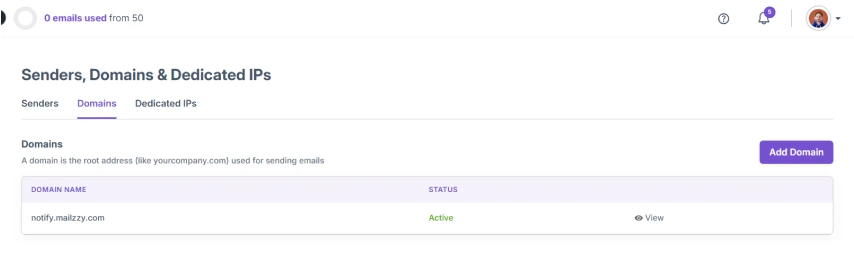
You can check your domain authentication status in Mailzzy by navigating to Senders, Domains & Dedicated IPs > Domains.
Step 4: Review Your Sender Reputation
Your sender reputation is tracked by inbox providers based on your sending history. If you are sending from a new domain or IP, make sure you have completed the warm-up process before launching a large campaign.
Step 5: Review Your List Quality
Poor list quality is a common cause of deliverability problems. Before sending:
- Remove contacts who have not engaged in the last 6 months
- Check for and remove any duplicate email addresses
- Make sure all contacts opted in to receive your emails


Let's keep in touch
Sign up for our weekly email marketing newsletter and Mailzzy updates.
For more details, review our Privacy Policy


© 2026 Mailzzy. All rights reserved.

