
Why Are My Emails Going to Spam?
Last updated on May 12, 2026
If your emails are ending up in the spam or junk folder instead of the inbox, you're not alone. This is one of the most common issues in email marketing. There are several reasons this might happen, and most of them can be fixed.
1. Your Domain Is Not Authenticated
Email authentication helps inbox providers recognize your emails as genuine. Without it, your messages may be flagged as suspicious.
- SPF – Verifies that your sending server has the right to send emails on behalf of your domain.
- DKIM – Adds a digital signature to your emails to ensure they haven’t been altered.
- DMARC – Tells inbox providers what to do if SPF or DKIM checks fail.
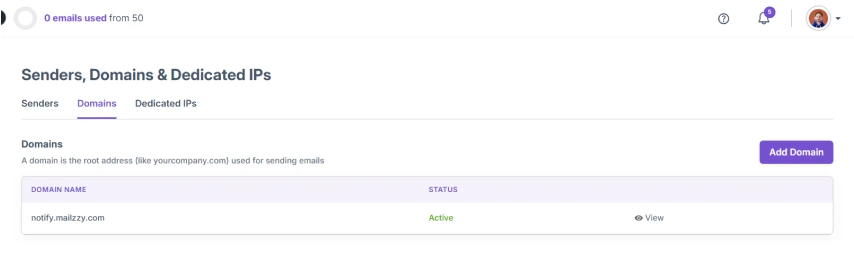
Note: If you're using a custom domain, ensure that you've completed domain authentication in Mailzzy. Go to Senders, Domains & Dedicated IPs > Domains to check your authentication status.
2. You Are Using a Free Email Domain as Your Sender
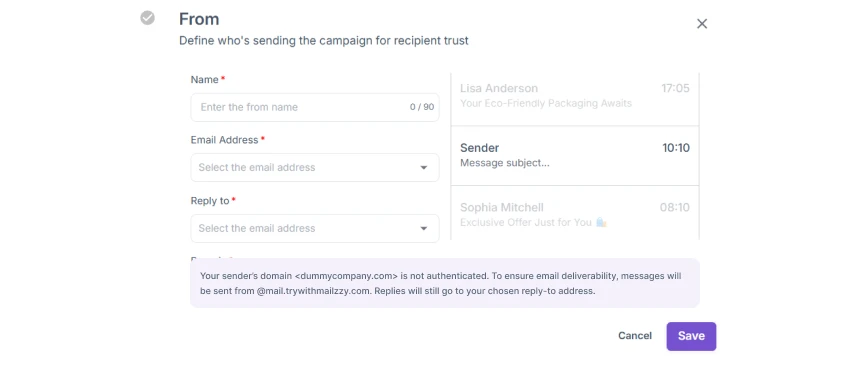
Sending emails from a free email address such as @gmail.com, @yahoo.com, or @outlook.com as your From address can activate spam filters. Major inbox providers have strict rules about this.
Mailzzy automatically replaces free email domains with a Mailzzy-managed domain to protect your email deliverability. For the best results, use a custom domain that you own and have authenticated.
3. Your Email Content Contains Spam Triggers
Certain words, phrases, and formatting choices are often linked to spam. These include:
- Using too many capital letters or exclamation marks (e.g., FREE!!!, ACT NOW!!!)
- Using spammy words like "make money fast," "guaranteed," or "limited time offer"
- Emails that are mostly images with very little text
- Poorly structured HTML or broken code
- Subject lines that don’t match the email content
4. You Are Sending to Unengaged or Invalid Contacts
Sending to contacts who never open your emails, have invalid addresses, or who marked previous emails as spam sends negative signals to inbox providers. Over time, this damages your sender reputation.
- Remove contacts who have not engaged with your emails in the past 3 to 6 months
- Regularly clean your list to remove invalid or bounced addresses
- Never purchase or use rented email lists
5. You Skipped the Warm-Up Process
If you are using a new sending domain or dedicated IP, inbox providers do not yet have a reputation to associate with it. Sending large volumes right away is a major red flag.
Start small and gradually increase your send volume over several weeks. See our guide on Warm Up Your Sending Domain or Dedicated IP for a step-by-step schedule.
6. Your Spam Detection Score Is High
Mailzzy includes a built-in spam detection tool that checks your campaign before sending. If your spam score is high, your email is more likely to be filtered.
Before sending any campaign, use the spam detection feature to review your score and address any flagged issues.
7. Your Unsubscribe Link Is Missing or Hard to Find
All marketing emails must include an easy-to-find unsubscribe link. If recipients cannot unsubscribe easily, they are more likely to mark your email as spam — which is far more damaging to your reputation.
Mailzzy automatically includes an unsubscribe link in every campaign. Make sure it is visible and not hidden in small print.


Let's keep in touch
Sign up for our weekly email marketing newsletter and Mailzzy updates.
For more details, review our Privacy Policy


© 2026 Mailzzy. All rights reserved.

