
How to Write Emails Using AI Assist
Last updated on May 18, 2026
Writing a compelling email from a blank page takes time and creative energy. Mailzzy's AI Assist feature shortens that process significantly. You provide a brief description of what you want, set your preferences, and AI Assist generates a complete, structured email draft ready for you to review and refine.
Accessing AI Assist
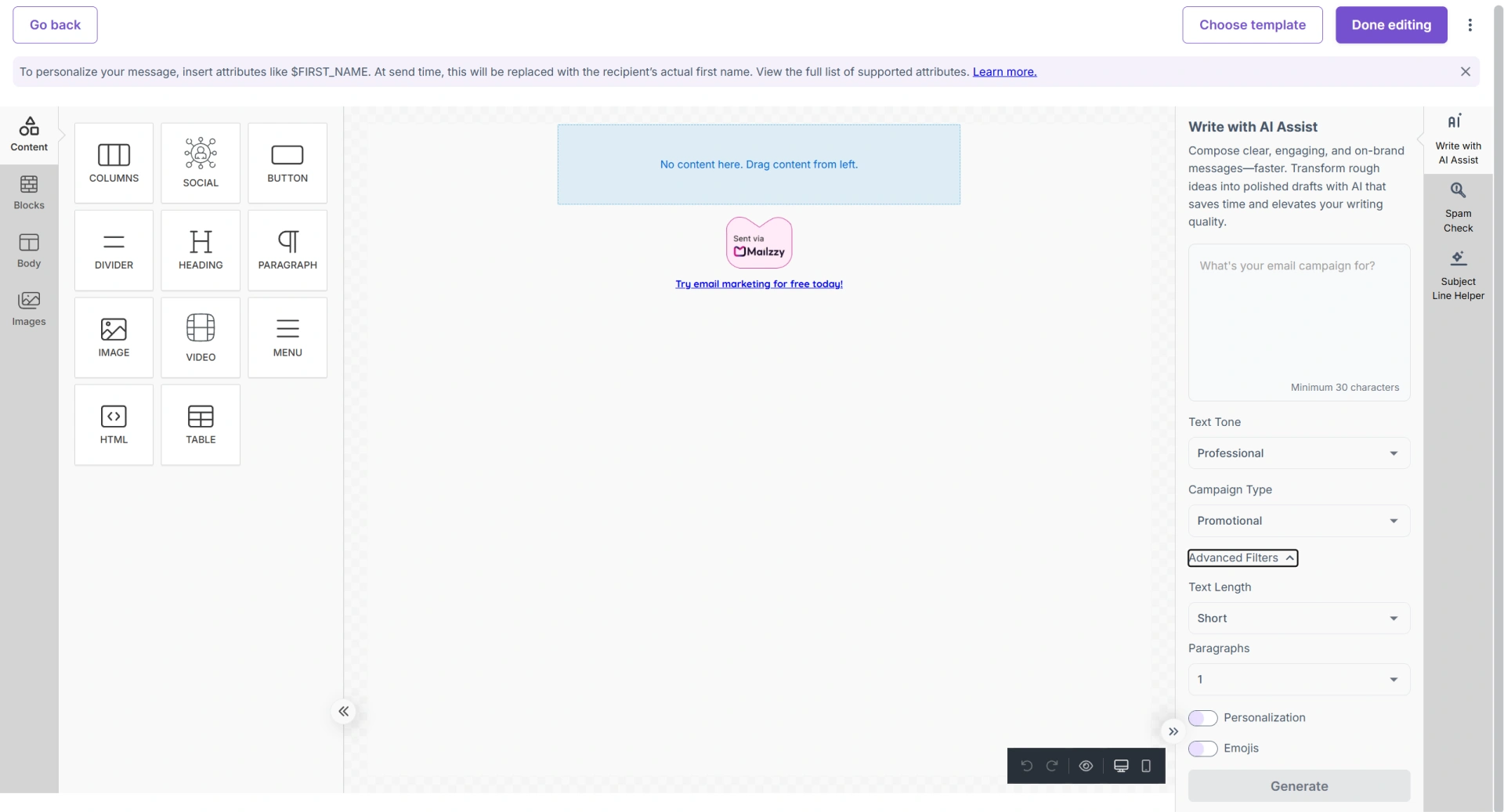
AI Assist is available inside the email editor. Look for the Write with AI Assist on the right panel. Click it to open the AI writing panel.
How to Generate Content
- Enter your prompt — describe the email you want to create. Example: "Write a friendly email promoting our summer skincare sale with 25% off all products."
- Choose your Text Tone: Professional, Casual, Friendly, or Bold.
- Select your Campaign Type: Newsletter, Promotional, Launch, Event, or Onboarding.
- Set your preferred Text Length: Short (under 100 words), Medium (100–200), or Long (200–400).
- Choose the number of paragraphs.
- Toggle Personalization if you want personalized tags to be included.
- Toggle Emojis on or off based on your brand style.
- Click Generate. Review the draft and click Apply to insert it into your email.
Choosing the Right Length
- Short (under 100 words) — Promotional bursts, quick announcements, single-CTA emails
- Medium (100–200 words) — Standard newsletters, product updates, event invitations
- Long (200–400 words) — Onboarding emails, educational content, detailed storytelling
Always Review Before Sending
AI Assist generates a draft — not a finished email. After applying the content, review and edit it to:
- Add specific details, offers, or dates the AI could not know
- Adjust the voice to match your brand precisely
- Replace generic phrases with language specific to your product and audience
- Add or update the call-to-action link


Let's keep in touch
Sign up for our weekly email marketing newsletter and Mailzzy updates.
For more details, review our Privacy Policy


© 2026 Mailzzy. All rights reserved.

