
The Limitations of Using a Free Email Domain as Sender
Last updated on May 12, 2026
Using a free email address such as @gmail.com, @yahoo.com, or @outlook.com as your From address in email marketing campaigns comes with significant limitations. Understanding these limitations helps you make an informed decision about your sender setup.
Why Free Email Domains Cause Problems
Major email providers like Google and Yahoo have strict security policies for domains they manage. When you use a free email address as your From address in a bulk email campaign, it often conflicts with these policies. This can result in:
- Your emails being redirected to the spam or junk folder
- Your From address being replaced or rewritten by receiving mail servers
- Your emails being rejected outright by some inbox providers
This is because free email providers use DMARC policies that restrict third-party sending on their behalf. When Mailzzy sends an email on your behalf using a @gmail.com address, it conflicts with Google's own DMARC policy, causing deliverability failures.
What Mailzzy Does With Free Email Addresses
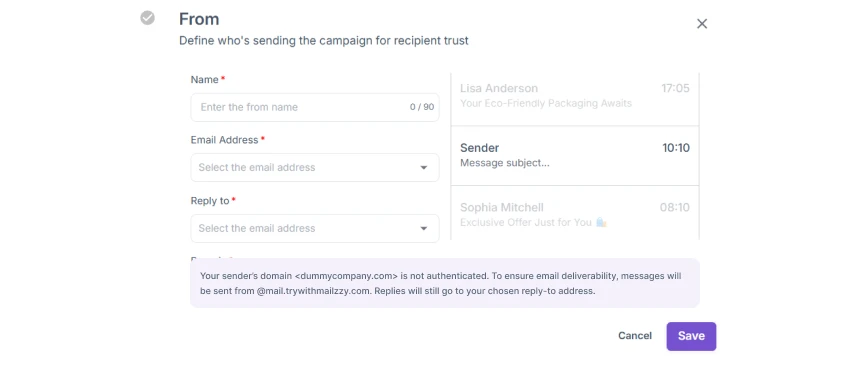
To protect your deliverability, Mailzzy automatically replaces free email domain addresses with a Mailzzy-managed sending domain (such as @trywithmailzzy.com or @sendwithmailzzy.com) when you send a campaign.
This means that even if you set a @gmail.com address as your From email, your recipients will see a Mailzzy-managed address in their inbox instead. While this protects your deliverability, it also means your branding is not fully represented in the From field.
The Solution: Use a Custom Domain
The best way to overcome these limitations is to use a custom domain email address — for example, hello@yourbusiness.com — and complete domain authentication in Mailzzy.
With a custom authenticated domain, your emails are sent using your own domain identity. This gives you:
- Full control over your From address – Your recipients see your real business email address
- Better deliverability – Authenticated custom domains perform significantly better than free or unauthenticated domains
- Stronger brand recognition – Recipients see your business name and domain in the inbox, building trust
- Full sender reputation ownership – Your sending history builds reputation on your own domain, not a shared one
How to Set Up a Custom Domain in Mailzzy
- Register a domain through any domain registrar if you do not already have one.
- In Mailzzy, go to Senders, Domains & Dedicated IPs > Domains.
- Add your domain and follow the instructions to set up add the records to your DNS.
- Once authenticated, create a new sender using your custom domain email address.
See the Domain Authentication Guide for Mailzzy for full step-by-step instructions.
Note: You do not need to change your personal email account. Your custom domain sending address is only used for Mailzzy campaigns.


Let's keep in touch
Sign up for our weekly email marketing newsletter and Mailzzy updates.
For more details, review our Privacy Policy


© 2026 Mailzzy. All rights reserved.

