
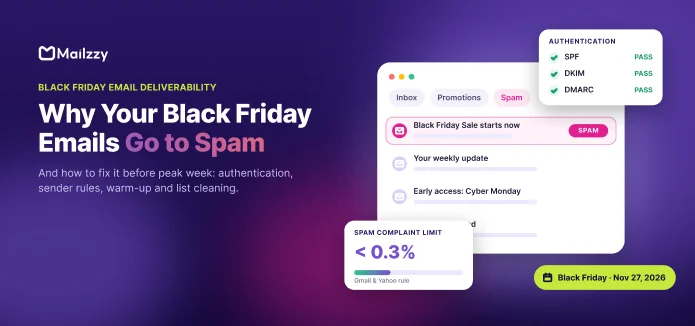

Why Your Black Friday Emails Go to Spam (and How to Fix It Before Peak Week)
Black Friday emails landing in spam? Learn why it happens in peak week and how to fix it with authentication, sender rules, list cleaning and a checklist.
Why Black Friday is the hardest week for deliverability
Signs your Black Friday emails are going to spam
The 6 most common reasons emails go to spam (and how to fix each)
How to check your deliverability before you send
Already landing in spam? What to do right now
Your Black Friday deliverability checklist
How Mailzzy helps
Frequently asked questions
Key takeaways
- Black Friday is the hardest week of the year for email deliverability. Every brand sends more, mailbox providers filter harder, and small setup problems that were hidden all year suddenly cost you sales.
- Most spam-folder problems in peak week come from four causes: missing or broken authentication (SPF, DKIM, DMARC), sudden volume spikes, old or unengaged contacts, and high complaint rates.
- Gmail, Yahoo and Microsoft now require bulk senders to authenticate their domain, offer one-click unsubscribe and keep spam complaints below 0.3%. Senders that miss these rules can be filtered or rejected.
- Deliverability is decided weeks before Black Friday, not on the day. Fix authentication and clean your list now, then raise volume gradually through November.
- If emails are already going to spam, stop sending to unengaged contacts first. It is the fastest way to recover your reputation.
Black Friday 2026 falls on Friday, November 27, with Cyber Monday on November 30. For most businesses, those few days bring in a large share of the year's email revenue. It is also the week when a campaign that looked perfect in testing quietly lands in the Promotions tab, the spam folder, or nowhere at all.
The frustrating part is that the email itself is rarely the problem. A good offer and a good subject line do not help if the mailbox provider has already decided not to trust the sender. This guide explains why sale emails go to spam in peak week, how to check whether it is happening to you, and the exact steps to fix it before November 27.
Why Black Friday is the hardest week for deliverability
Mailbox providers such as Gmail, Yahoo and Outlook decide where each email goes based mainly on sender reputation: how much they trust your domain and sending servers, based on how recipients have reacted to your past emails. Content matters, but reputation matters far more.
Black Friday puts pressure on reputation in three ways at once:
- Every inbox is crowded. Recipients get many more promotional emails than usual, so they ignore, delete or report more of them. Lower engagement and more complaints both damage reputation.
- Senders change their behavior. Brands that email once a week start emailing daily, and many dig up old contacts they have not emailed in a year. Sudden changes in volume look like spam to a filter.
- Filters are under load. Providers see a flood of new senders, new domains and unusual traffic in the same week, and they protect their users by being stricter.
So a sender that reached the inbox in October can hit spam in November without changing anything except volume and frequency. That is why deliverability has to be prepared in advance.
Signs your Black Friday emails are going to spam
Most senders do not get a warning when emails start landing in spam. Look for these signals:
- Open rates drop sharply compared with your normal campaigns, especially for Gmail or Outlook addresses only.
- Click rates fall even though the offer is strong.
- Bounces increase, with messages mentioning policy, reputation, authentication or "rate limited".
- Your own test emails arrive in spam or in Promotions when they used to reach the primary inbox.
- Customers tell you they did not get your sale email.
- Spam rate rises in Google Postmaster Tools, the free dashboard that shows how Gmail sees your domain.
One caution about open rates: Apple Mail Privacy Protection loads images automatically, which inflates open rates for Apple users. Compare opens by mailbox provider and watch clicks too, rather than relying on one total open rate.
The 6 most common reasons emails go to spam (and how to fix each)
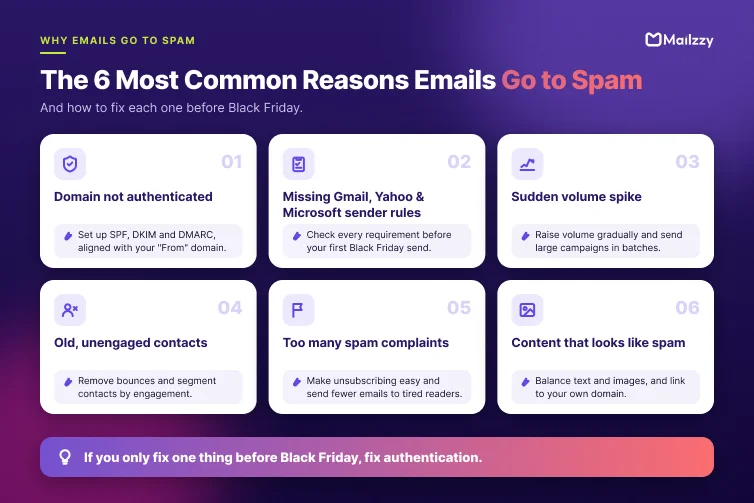
1. Your domain is not properly authenticated
Authentication proves to mailbox providers that an email really comes from you. There are three standards, and bulk senders now need all three:
- SPF (Sender Policy Framework) lists the servers allowed to send email for your domain. It is a TXT record in your DNS.
- DKIM (DomainKeys Identified Mail) adds a digital signature to each email so the receiver can confirm it was not changed in transit.
- DMARC (Domain-based Message Authentication, Reporting and Conformance) tells receivers what to do if SPF or DKIM fails, and sends you reports about who is sending email using your domain.
How to fix it:
- Make sure your email platform's sending servers are included in your SPF record. Have only one SPF record per domain, and keep it under the limit of 10 DNS lookups.
- Set up DKIM signing with your own domain, not your email platform's shared domain.
- Publish a DMARC record. A policy of p=none is the minimum required and is a safe starting point. For example:
v=DMARC1; p=none; rua=mailto:dmarc@yourdomain.com
- Check alignment: the domain in your visible "From" address must match the domain used by SPF or DKIM.
If you only fix one thing before Black Friday, fix this. Unauthenticated mail is the most likely to be rejected outright. In Mailzzy, follow our step-by-step domain authentication guide.
2. You are not meeting the Gmail, Yahoo and Microsoft sender rules
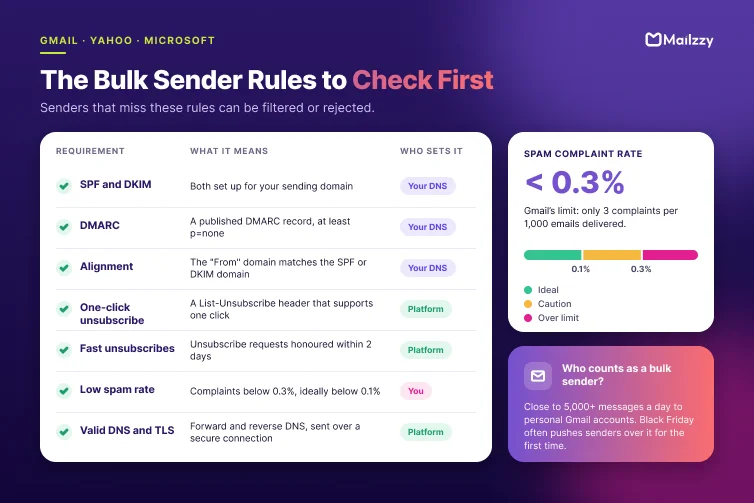
Since February 2024, Gmail and Yahoo have required bulk senders (Google defines this as sending close to 5,000 or more messages a day to personal Gmail accounts) to follow a set of rules. Microsoft introduced similar rules for Outlook.com, Hotmail and Live addresses in 2025, and Google has said it is enforcing its rules more strictly on non-compliant traffic. Black Friday campaigns often push a sender over the bulk threshold for the first time.
The main requirements are:
| Requirement | What it means |
|---|---|
| SPF and DKIM | Both set up for your sending domain |
| DMARC | A published DMARC record, at least p=none |
| Alignment | The "From" domain matches the SPF or DKIM domain |
| One-click unsubscribe | Marketing emails include a List-Unsubscribe header that supports one-click unsubscribe |
| Fast unsubscribes | Unsubscribe requests are honored within 2 days |
| Low spam rate | Spam complaints stay below 0.3%, ideally below 0.1%, in Postmaster Tools |
| Valid DNS and TLS | Sending servers have valid forward and reverse DNS and send over a secure (TLS) connection |
How to fix it: Check each row before your first Black Friday send. Your email platform should handle one-click unsubscribe headers, TLS and server DNS for you. SPF, DKIM and DMARC usually need a change in your own domain's DNS settings.
3. You are suddenly sending far more than usual
Mailbox providers trust consistent senders. If you normally send 10,000 emails a week and suddenly send 80,000 in one day, filters treat it as suspicious, even if every address opted in.
How to fix it:
- Increase volume gradually. Through late October and November, send slightly larger campaigns each week so that peak week is a step up, not a jump.
- Send to your most engaged contacts first. Start early sends with people who opened or clicked recently. Their positive engagement builds reputation for the bigger sends later.
- Spread large sends out. Rather than sending to the whole list in one minute, send in batches over a few hours.
- New domain or dedicated IP? These need a proper warm-up over several weeks. If you are setting one up in November, it is usually safer to send peak-week campaigns from your established setup.
4. Your list is full of old and unengaged contacts
Black Friday is when many brands email everyone they have ever collected. This is one of the fastest ways to reach spam. Old lists contain:
- Invalid addresses that bounce and signal poor list hygiene.
- Abandoned inboxes that providers turn into spam traps: addresses that exist only to catch senders who do not clean their lists.
- People who forgot they subscribed, who are the most likely to click "Report spam".
How to fix it:
- Remove hard bounces and invalid addresses before your first November send.
- Segment by engagement. For example: engaged in the last 90 days, engaged in the last 6 months, and no engagement for more than 6 months.
- Send a re-engagement email in October to contacts with no recent activity. Keep those who respond and stop sending to the rest.
- Never use bought or scraped lists. They are full of spam traps and complaints, and sending to them breaks most email platforms' terms.
A smaller list that reaches the inbox earns more than a big list that reaches spam.
5. Too many people are reporting your emails as spam
Spam complaints are one of the strongest negative signals a provider sees. Gmail's limit is a spam rate below 0.3%, which is only 3 complaints per 1,000 emails delivered. In peak week, when people are tired of promotions, it is easy to cross.
How to fix it:
- Make unsubscribing easy. Put a clear unsubscribe link at the top or bottom of the email. People who cannot find it often report spam instead.
- Offer a "less email" option. Let subscribers choose fewer Black Friday emails rather than leaving completely.
- Set expectations. Tell subscribers in advance that your sale is coming and roughly how many emails to expect.
- Use a recognizable sender name. If people do not recognize who the email is from, they are more likely to report it.
- Avoid sending every email to everyone. Send reminders and "last chance" emails only to people who opened earlier emails but have not bought. Email automation can send these follow-ups for you.
6. Your email content looks like spam
Content is a smaller factor than reputation, but it can still push a borderline email into spam. Common problems in sale emails are:
- One large image with little or no text. Filters cannot read the image, and many readers have images turned off.
- Link shorteners such as bit.ly, which spammers also use to hide destinations.
- Links to domains with a poor reputation, or to many different domains in one email.
- Misleading subject lines like a fake "Re:" or "Your order", which raise complaints.
- Heavy, broken HTML copied from several sources.
How to fix it: Use a balance of text and images, link to your own domain, keep HTML clean and make the subject line match the content. A few words like "free" or "sale" will not send a trusted sender to spam, so focus on these structural problems rather than avoiding specific words.
How to check your deliverability before you send
Run these checks at least two weeks before Black Friday, so you have time to fix what you find:
- Check your DNS records. Use your email platform's domain settings page or a free DNS lookup tool to confirm SPF, DKIM and DMARC are published and passing.
- Read the email headers. Send a test to a Gmail account, open it, and choose "Show original". Check that SPF, DKIM and DMARC all show PASS.
- Set up Google Postmaster Tools. Add and verify your domain to see your spam rate and authentication results for Gmail. Do this early, because data only appears once you send enough volume.
- Send seed tests. Send your campaign to test accounts at Gmail, Outlook, Yahoo and any major providers your customers use, and note where it lands.
- Check blocklists. Use a free blocklist checker to confirm your sending domain is not listed.
- Review your last few campaigns. Look at bounce rates, complaint rates and opens by mailbox provider. A provider where results have suddenly dropped is a warning sign.
Already landing in spam? What to do right now
If your Black Friday campaign is already going to spam, do not keep sending to the full list. More volume to the same audience makes the problem worse. Instead:
- Pause large sends to unengaged contacts immediately.
- Send only to your most engaged segment (people who opened or clicked in the last 30 to 60 days) for the next few campaigns. Positive engagement rebuilds reputation.
- Check authentication using the email header steps above. A recent DNS change, or a new tool added to your SPF record, can break it without you noticing.
- Check the bounce messages. Many rejections explain the reason, such as authentication failure, rate limiting or a blocklist.
- Lower your sending speed and spread campaigns over more hours.
- Fix the cause, then expand slowly. Add less engaged segments back gradually over several days, watching your spam rate.
Reputation usually recovers within days to a few weeks once the cause is fixed and you keep sending good, wanted email.
Your Black Friday deliverability checklist
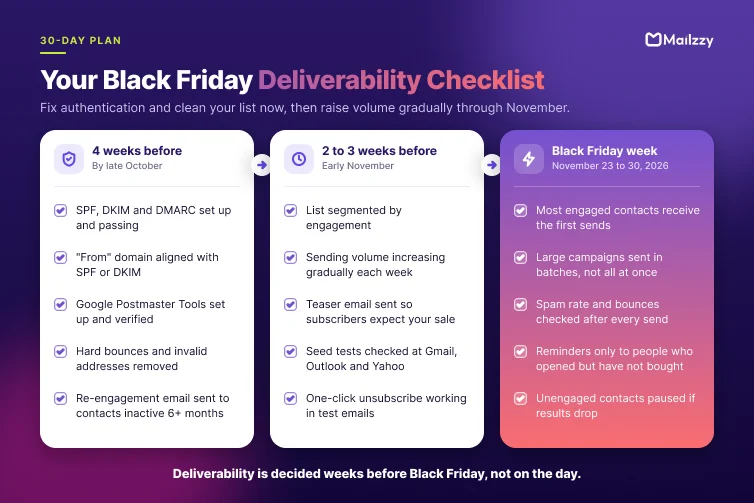
4 weeks before (by late October)
- SPF, DKIM and DMARC set up and passing for your sending domain
- "From" domain aligned with SPF or DKIM
- Google Postmaster Tools set up and verified
- Hard bounces and invalid addresses removed
- Re-engagement email sent to contacts with no activity for 6 months or more
2 to 3 weeks before (early November)
- List segmented by engagement
- Sending volume increasing gradually each week
- Teaser email sent so subscribers expect your sale
- Seed tests checked at Gmail, Outlook and Yahoo
- One-click unsubscribe working in test emails
Black Friday week (November 23 to 30, 2026)
- Most engaged contacts receive the first sends
- Large campaigns sent in batches, not all at once
- Spam rate and bounces checked after every send
- Reminder emails sent only to people who opened but have not bought
- Unengaged contacts paused if results drop
How Mailzzy helps
Mailzzy is built to help your emails reach the inbox, not just leave your account. Before Black Friday, you can use it to:
- Authenticate your domain with guided SPF, DKIM and DMARC setup.
- Segment by engagement so your biggest sends go to the people most likely to open them.
- Handle unsubscribes automatically, including one-click unsubscribe headers.
- Track bounces, complaints and campaign performance so you can spot a problem after the first send, not after the last.
See Mailzzy plans before Black Friday
Frequently asked questions
Is landing in the Promotions tab the same as going to spam?
No. The Gmail Promotions tab is still part of the inbox, and recipients who expect sale emails often look there. Spam is a separate folder that most people never check. During Black Friday, reaching Promotions is normal and acceptable. Reaching spam is the problem to fix.
When does Black Friday 2026 start?
Black Friday 2026 is on Friday, November 27, the day after US Thanksgiving. Cyber Monday is on November 30. Many brands start sending sale emails one to two weeks earlier, so deliverability preparation should start by late October.
How many emails can I send on Black Friday without going to spam?
There is no fixed number. What matters is how much your volume changes and how recipients react. A sender that increases volume gradually, emails engaged contacts and keeps complaints low can send several emails in Black Friday week. A sender that suddenly emails a whole old list once can still land in spam.
Do spam trigger words still matter?
Much less than they used to. Modern filters rely mainly on sender reputation, authentication and recipient engagement. Words like "sale" or "free" will not send a trusted sender to spam. Misleading subject lines, image-only emails and suspicious links matter more.
What is a good spam complaint rate?
Keep it below 0.1% where possible, and never above 0.3%, which is the limit in Gmail's sender rules. That means fewer than 1 to 3 complaints for every 1,000 delivered emails.
Also read

From A to Z: An Email Marketing Glossary for Beginners and Experts
Explore key email marketing terms in our glossary. Understand deliverability, automation, segmentation, and more to improve your email campaigns.

St. Patrick’s Day Email Campaigns with Luck-Inspired Marketing Ideas
Discover creative St. Patrick’s Day email campaign ideas to engage customers, increase sales, and make the most of this festive holiday.


Let's keep in touch
Sign up for our weekly email marketing newsletter and Mailzzy updates.
For more details, review our Privacy Policy


© 2026 Mailzzy. All rights reserved.

