
Complete Guide to Using the Mailzzy Mobile App
Last updated on May 14, 2026
The Mailzzy mobile app lets you manage your email marketing on the go. Whether you need to check campaign performance, review your contact list, or monitor activity away from your desk, the mobile app keeps you connected to your account from anywhere.
Downloading the Mailzzy App
The Mailzzy app is available for both iOS and Android devices:
- iOS – Download from the Apple App Store
- Android – Download from the Google Play Store
Search for Mailzzy in your device's app store and tap Install. The app is free to download.
Logging In
Open the app and log in using the same email address and password you use on the Mailzzy website. If you have two-factor authentication or passkeys enabled on your account, you will be prompted to complete the additional verification step.
What You Can Do in the Mobile App
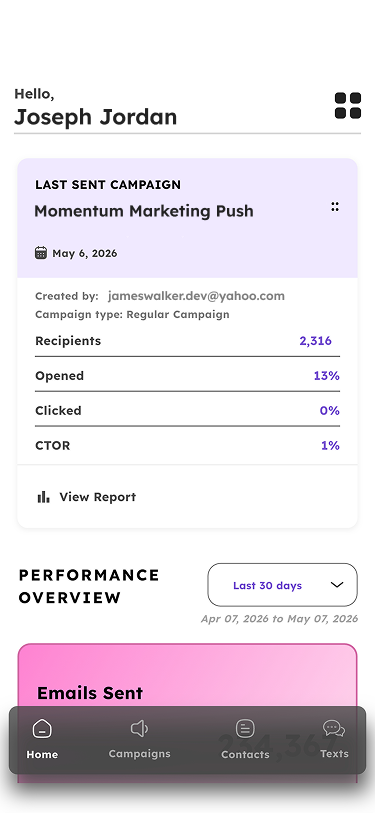
The Mailzzy mobile app is designed for monitoring and managing your account while away from your desk. Key features available in the app include:
- Campaign overview – View a list of your campaigns and their current status
- Campaign reports – Check open rates, click rates, delivery rates, and unsubscribe rates for sent campaigns
- Contacts – Browse your contact list and view individual contact details
- Notifications – Receive alerts and updates about your account activity
- Resend Campaign – Send a previously sent campaign to a new list of recipients.
Account Security on Mobile
Your Mailzzy account security settings apply on mobile the same as they do on the web. If you have two-factor authentication enabled, you will be required to verify your identity each time you log in on a new device.
If you use passkeys, make sure your device supports passkey authentication. You can manage your passkey settings in the Security section of your account.
Note: For full campaign creation and editing, we recommend using the Mailzzy web platform on a desktop or laptop browser. The mobile app is optimized for monitoring and reviewing your account activity.
Staying Signed In
On most devices, the Mailzzy app will keep you signed in between sessions. If you are signing in on a shared or public device, make sure to log out after each session to protect your account.
Updating the App
Keep the Mailzzy app updated to the latest version to access new features and security improvements. Enable automatic updates in your device settings, or check the App Store or Google Play Store regularly for available updates.


Let's keep in touch
Sign up for our weekly email marketing newsletter and Mailzzy updates.
For more details, review our Privacy Policy


© 2026 Mailzzy. All rights reserved.