
Understanding Hard Bounces vs Soft Bounces
Last updated on May 12, 2026
A bounce occurs when an email cannot be delivered to a recipient's inbox. Not all bounces are the same — understanding the difference between hard and soft bounces helps you keep your list clean and protect your sender's reputation.
What Is a Hard Bounce?
A hard bounce is a permanent delivery failure. It means the email address is invalid or no longer exists. Common reasons include:
- The email address does not exist (e.g., it was typed incorrectly)
- The recipient's domain no longer exists
- The recipient's email server has permanently blocked your sending address
Hard bounces are serious. Repeatedly sending to invalid addresses signals to inbox providers that your list quality is poor, which can damage your sender reputation.
Note: Mailzzy automatically marks hard-bounced contacts, so they are excluded from future campaigns. You should review and remove these addresses from your list.
What Is a Soft Bounce?
A soft bounce is a temporary delivery failure. The email address is valid, but the email could not be delivered at that moment. Common reasons include:
- The recipient's mailbox is full
- The recipient's email server was temporarily unavailable
- The email was too large to be delivered
- The recipient's server placed a temporary block on incoming messages
Soft bounces are less serious than hard bounces. Mailzzy will attempt to redeliver soft-bounced emails automatically. If an address continues to soft bounce over time, it will eventually be treated as a hard bounce.
How to Find Bounce Information in Mailzzy
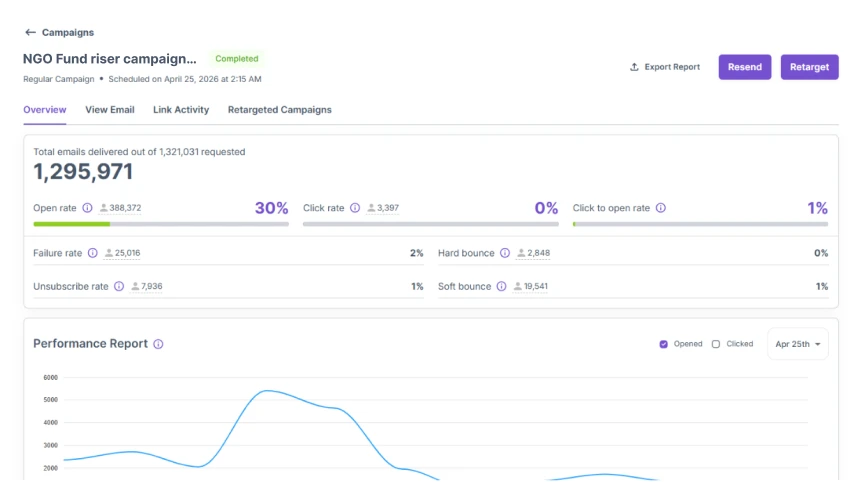
You can view bounce data for any sent campaign in your campaign reports:
- Go to the Campaigns page.
- Click on the sent campaign you want to review.
- Look for the Bounces section, which shows a breakdown of hard and soft bounces.
How Mailzzy Handles Bounced Emails
Hard bounces – These contacts are automatically removed from the sending list. Continuing to send to invalid addresses can negatively impact your deliverability.
Soft bounces – Mailzzy will retry sending up to 5 times. If the email continues to soft bounce after multiple attempts, the contact is treated as a hard bounce and removed from the sending list.
Note: Maintaining a clean contact list with low bounce rates is essential for protecting your sender reputation and improving inbox placement.


Let's keep in touch
Sign up for our weekly email marketing newsletter and Mailzzy updates.
For more details, review our Privacy Policy


© 2026 Mailzzy. All rights reserved.

