

Email Marketing Plan for 2027: How to Set Goals and Budget for the Year
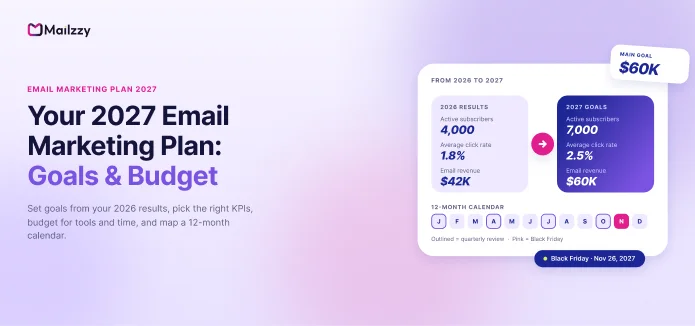
Build your 2027 email marketing plan: set goals from 2026 results, pick the right KPIs, budget for tools and time, and map a 12-month campaign calendar.
Why you need an email marketing plan (not just a sending habit)
Step 1: Review your 2026 results
Step 2: Set your 2027 email marketing goals
Step 3: Choose the KPIs you'll track
Step 4: Set your email marketing budget
Step 5: Plan your 2027 email calendar
Step 6: Build automations that work all year
Step 7: Plan list growth and list hygiene
Step 8: Review the plan every quarter
Your 2027 email marketing plan template
How Mailzzy helps you run your 2027 plan
Frequently asked questions
Key takeaways
- A good email marketing plan fits on one page: one main goal, three to five KPIs, a monthly budget, a list-growth target and a 12-month calendar.
- Start from your 2026 numbers, not from guesses. Your Black Friday and holiday results are the most useful data you have all year.
- Set goals around revenue or conversions first, then work backwards to the list size, send frequency and open and click rates you need to get there.
- Budget for three things, not one: your email platform, the time to create and send campaigns, and list growth (sign-up forms, lead magnets, ads).
- Lock in your big seasonal dates now. Black Friday 2027 falls on November 26 and Cyber Monday on November 29, so peak-season preparation should start in early October.
The last weeks of December are the best time to plan your email marketing for the year ahead. Black Friday and Cyber Monday are over, your holiday results are fresh, and January is usually quieter. A few hours spent now saves you from a year of last-minute campaigns and "we should email our list" moments.
This guide walks you through building a complete 2027 email marketing plan: reviewing 2026, setting realistic goals, choosing the right metrics, setting a budget and mapping your campaigns month by month. A template you can copy is at the end.
Why you need an email marketing plan (not just a sending habit)
Most small businesses send email when they have something to say: a new product, a sale, a holiday. That works until it doesn't. Without a plan, you tend to:
- Send unevenly. Nothing for six weeks, then four emails in one week. Mailbox providers notice sudden jumps in volume, and so do your subscribers.
- Miss seasonal moments. Valentine's Day, Mother's Day and Black Friday campaigns get written the night before, or not at all.
- Spend without measuring. You pay for a tool every month but can't say what it returns.
- Let the list decay. Contacts who stopped opening a year ago keep receiving email and keep hurting your deliverability.
A written plan fixes all four. It also makes it much easier to tell whether email is working, and whether to spend more on it.
Step 1: Review your 2026 results
Before setting any 2027 goals, take an hour to look at what actually happened this year. Pull these numbers from your email platform and your store or CRM:
| Metric | Where to find it | What it tells you |
|---|---|---|
| Total list size (Jan vs Dec) | Contacts / audience report | How fast your list is growing |
| Active contacts (opened or clicked in the last 90 days) | Engagement segment | Your real reachable audience |
| Average click rate | Campaign reports | How relevant your content is |
| Unsubscribe and spam complaint rate | Campaign reports | Whether you're sending too often or to the wrong people |
| Bounce rate | Campaign reports | List quality |
| Revenue or conversions from email | Store, GA4 (UTM tags) or CRM | What email is worth to the business |
| Best and worst 5 campaigns | Campaign reports | What to repeat and what to drop |
| Black Friday / Cyber Monday results | Campaign + sales reports | Your peak-season baseline for 2027 |
Then answer three questions in writing:
- What worked? Which campaigns, subject lines, offers or send times performed best?
- What didn't? Which campaigns had low clicks, high unsubscribes or no sales?
- What did we never get to? Automations, welcome series or seasonal campaigns you meant to build but didn't.
Tip: Open rates have been less reliable since Apple Mail Privacy Protection, which can count emails as opened even when they weren't read. Use clicks, conversions and revenue as your main measures of success, and treat opens as a rough signal only.
Step 2: Set your 2027 email marketing goals
Pick one main goal for the year. Everything else in the plan should support it. Common main goals are:
- Grow revenue from email (ecommerce, online services)
- Generate more leads or booked calls (B2B, agencies, consultants)
- Increase repeat purchases or retention (subscriptions, repeat-buy products)
- Raise more donations (nonprofits)
- Build an audience (creators, new businesses)
Then make it specific using the SMART method: specific, measurable, achievable, relevant and time-bound.
| Vague goal | SMART goal |
|---|---|
| "Grow our list" | Grow from 4,000 to 7,000 active subscribers by December 31, 2027 |
| "Make more money from email" | Generate $60,000 in email-attributed revenue in 2027, up from $42,000 in 2026 |
| "Improve engagement" | Raise average click rate from 1.8% to 2.5% by June 30, 2027 |
| "Do better at Black Friday" | Grow Black Friday-week email revenue by 30% vs 2026 |
Work backwards from revenue
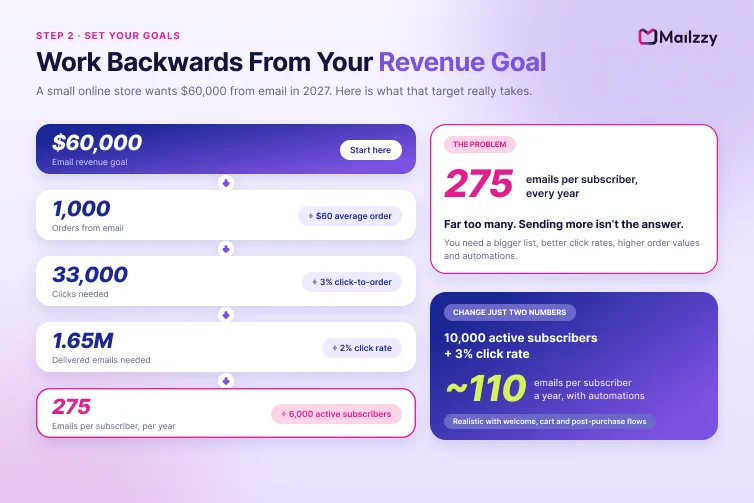
If revenue is your main goal, you can estimate what it takes to hit it. Here is a simple example for a small online store:
- Goal: $60,000 email revenue in 2027
- Average order value: $60, so you need about 1,000 orders from email
- Conversion rate from click to order: 3%, so you need about 33,000 clicks
- Average click rate: 2%, so you need about 1.65 million delivered emails in the year
- With 6,000 active subscribers on average, that's about 275 emails per subscriber, which is far too many
That last line is the useful part. It shows the goal can't be reached by sending more. You need some mix of a bigger list, better click rates, higher order values and automations that sell without extra campaigns. Changing just two numbers, growing to 10,000 active subscribers and lifting click rate to 3%, brings it down to about 110 emails per subscriber across the year, which becomes realistic once welcome series, abandoned-cart and post-purchase emails are included.
Run this calculation with your own numbers. It turns a hopeful target into a plan you can act on.
Step 3: Choose the KPIs you'll track
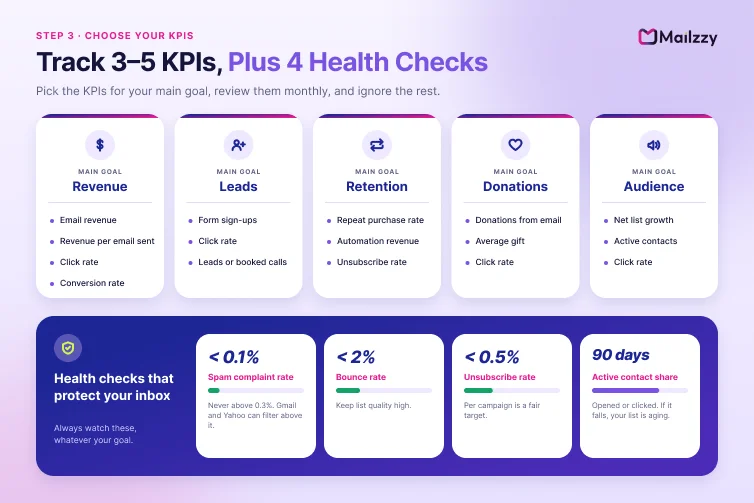
Track three to five metrics, review them monthly, and ignore the rest. Here are the ones that matter most for each goal:
| Main goal | KPIs to track |
|---|---|
| Revenue | Email revenue, revenue per email sent, click rate, conversion rate |
| Leads | Form sign-ups, click rate, leads or booked calls from email |
| Retention | Repeat purchase rate, revenue from automations, unsubscribe rate |
| Donations | Donations from email, average gift, click rate |
| Audience | Net list growth, active contacts, click rate |
Whatever your goal, always watch these health metrics, because they protect your ability to reach the inbox:
- Spam complaint rate: keep it below 0.1%, and never above 0.3%. Gmail and Yahoo can filter or reject bulk senders above that level.
- Bounce rate: under 2%.
- Unsubscribe rate: under 0.5% per campaign is a reasonable target for most lists.
- Active contact share: the percentage of your list that has clicked or opened in the last 90 days. If it falls, your list is aging.
For more on the sender rules behind these limits, see our guide to why emails go to spam and how to fix it.
Step 4: Set your email marketing budget
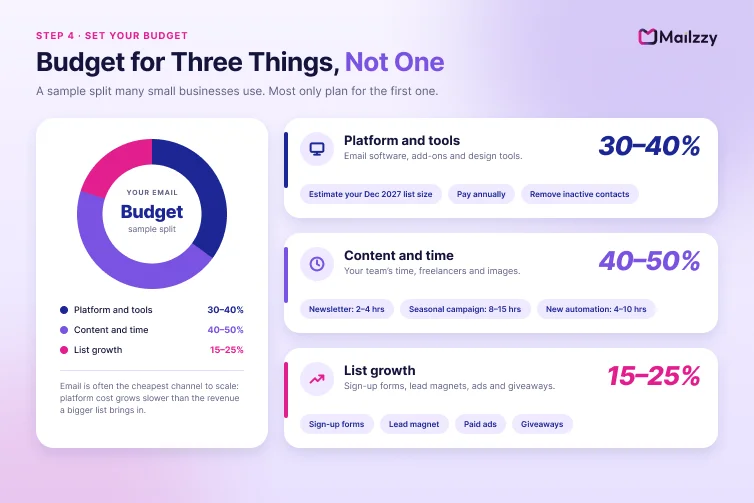
An email marketing budget has three parts. Most small businesses only plan for the first one.
1. Platform and tools
This is your email marketing software, plus any add-ons such as a dedicated IP, extra contacts or a design tool. Platform cost is usually based on number of contacts and emails sent per month, so estimate your December 2027 list size, not your current one, when choosing a plan.
Ways to keep this cost down:
- Pay annually if you're confident in your platform. Most providers discount annual billing.
- Remove inactive contacts regularly. You pay for every contact, including people who will never open again.
- Choose a platform that includes CRM, automation and AI writing so you aren't paying for three separate tools.
For a full breakdown of pricing models, read how much email marketing costs.
2. Time and content
Every campaign takes time to plan, write, design, test and review. A simple way to budget it:
- Regular newsletter or promotional email: 2 to 4 hours each
- Seasonal campaign (3 to 5 emails): 8 to 15 hours
- New automation (welcome, abandoned cart, win-back): 4 to 10 hours to set up, then very little ongoing time
If you send one campaign a week and build four automations in the year, that's roughly 150 to 250 hours, or 3 to 5 hours a week. Decide now whether that time comes from you, a team member, a freelancer or AI writing tools.
3. List growth
Your list shrinks by itself every year as people change jobs, abandon addresses and unsubscribe. Budget something to replace them and grow:
- Sign-up forms and pop-ups on your website
- A lead magnet (discount, guide, checklist or free template)
- Paid social or search ads that send people to a sign-up page
- Giveaways or partnerships with other businesses
A sample budget split
There's no single right number, but many small businesses split their email budget roughly like this:
| Budget area | Share | What it covers |
|---|---|---|
| Platform and tools | 30–40% | Email software, add-ons, design tools |
| Content and time | 40–50% | Your team's time, freelancers, images |
| List growth | 15–25% | Lead magnets, sign-up ads, giveaways |
If email is one of your best-performing channels, it is often the cheapest place to increase spend, since your platform cost grows much more slowly than the revenue a larger list can bring in.
Step 5: Plan your 2027 email calendar
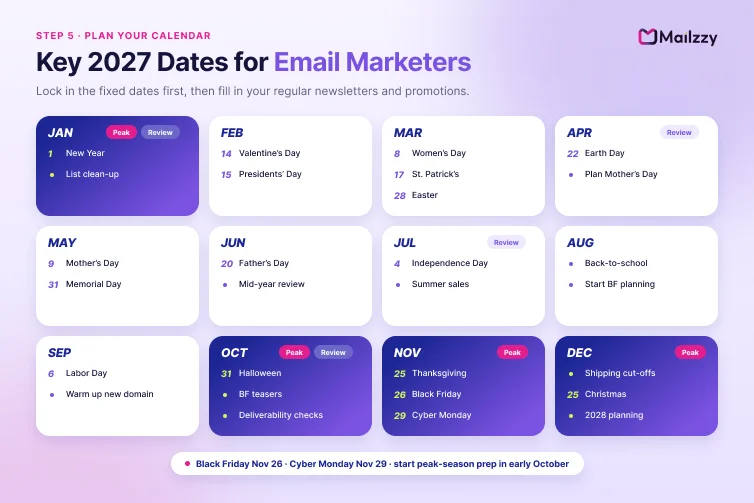
With goals and budget set, map out the year. Start with fixed dates, then fill in your regular content.
Key 2027 dates for email marketers
| Month | Dates and campaign ideas |
|---|---|
| January | New Year (Jan 1); new-year offers, "plan your year" content, list clean-up and re-engagement campaign |
| February | Valentine's Day (Sun, Feb 14); gift guides, couples' offers, "treat yourself" campaigns. Presidents' Day sales (Feb 15) |
| March | International Women's Day (Mar 8), St. Patrick's Day (Mar 17), spring launches. Easter is Sunday, March 28 |
| April | Spring sales, Earth Day (Apr 22), plan Mother's Day |
| May | Mother's Day (Sun, May 9), Memorial Day sales (May 31) |
| June | Father's Day (Sun, June 20), mid-year sale, half-year results review |
| July | Independence Day (July 4), summer sales, mid-year re-engagement campaign |
| August | Back-to-school, start Black Friday planning and audience segmentation |
| September | Labor Day (Sept 6), autumn launches, authenticate and warm up any new sending domain |
| October | Halloween (Oct 31), Black Friday teasers, early-access sign-up list, deliverability checks |
| November | Thanksgiving (Nov 25), Black Friday (Nov 26), Small Business Saturday (Nov 27), Cyber Monday (Nov 29), Giving Tuesday (Nov 30) |
| December | Shipping cut-off reminders, last-minute gift emails, Christmas, year-end thank-you email, 2028 planning |
Add the dates that matter to your business: product launches, your company anniversary, industry events, local holidays or festivals such as Diwali if you serve customers in India.
Decide your sending rhythm
Choose a frequency you can keep up all year, then stick to it. Consistency matters more than volume. For most small businesses:
- Newsletter or value email: weekly or every two weeks
- Promotional email: one to four a month, more during seasonal peaks
- Automations: always running in the background
If you plan to send more in November and December, increase volume gradually from October rather than jumping suddenly. Our guide to domain warm-up explains how.
To pick days and times, start from our research on the best time to send marketing emails, then test against your own audience.
Step 6: Build automations that work all year
Campaigns get attention, but automations often bring in revenue more consistently because they reach people at the right moment, every time. If you only add a few new things in 2027, make them these:
- Welcome series (3 to 5 emails): introduce your brand, set expectations and make a first offer. New subscribers are usually the most engaged people on your list.
- Abandoned cart or browse reminder: remind people about products they looked at or left behind.
- Post-purchase series: thank buyers, help them use the product and suggest what to buy next. This is the best way to turn Black Friday buyers into repeat customers.
- Win-back campaign: re-engage contacts who haven't clicked in 90 to 180 days, then remove those who still don't respond.
- Birthday or anniversary email: simple to set up and consistently well received.
Schedule one new automation per quarter so the work is spread across the year. Learn more in our guide to email marketing automation.
Step 7: Plan list growth and list hygiene
A plan for 2027 needs both new subscribers in and inactive ones out.
Growth targets
- Set a monthly target for net new subscribers (new sign-ups minus unsubscribes and removals).
- Place sign-up forms on your homepage, blog posts, checkout and footer.
- Offer a clear reason to subscribe, such as a discount, a useful guide or early access to sales.
Hygiene schedule
- Every campaign: remove hard bounces automatically.
- Every quarter: send a re-engagement email to contacts with no clicks for 90 days or more.
- Twice a year: remove contacts who didn't respond to re-engagement.
- Before Black Friday: run a full list clean-up by early October.
A smaller, engaged list almost always earns more, costs less and reaches the inbox more reliably than a large, inactive one.
Step 8: Review the plan every quarter
Your plan isn't fixed. Put four review dates in your calendar now: early April, early July, early October and early January 2028. At each review:
- Compare your KPIs to your targets.
- Check your top and bottom campaigns of the quarter.
- Adjust send frequency, content or offers if needed.
- Confirm the next quarter's campaigns and automations.
The October review matters most. It's your last chance to fix deliverability, clean your list and finish segments before Black Friday.
Your 2027 email marketing plan template
Copy this into a document and fill it in.
2027 EMAIL MARKETING PLAN

1. 2026 SNAPSHOT
   Active subscribers (Dec 2026):
   Email revenue / conversions 2026:
   Average click rate:
   Best campaign:
   Biggest gap:

2. MAIN GOAL FOR 2027 (SMART)

3. KPIs (3–5) AND TARGETS
   KPI 1:            Target:
   KPI 2:            Target:
   KPI 3:            Target:
   Health checks:    Spam rate < 0.1% | Bounces < 2%

4. BUDGET
   Platform and tools:     $____ / month
   Content and time:       ____ hours / week   or   $____ / month
   List growth:            $____ / month
   Total annual budget:    $____

5. LIST GROWTH
   Start:            Target (Dec 31, 2027):
   Main sign-up sources:

6. SENDING RHYTHM
   Newsletter:       ____ per month
   Promotional:      ____ per month
   Peak season:      ____ per week (Nov–Dec)

7. AUTOMATIONS TO BUILD
   Q1:
   Q2:
   Q3:
   Q4:

8. KEY CAMPAIGNS (by month)
   Jan:    Feb:    Mar:    Apr:    May:    Jun:
   Jul:    Aug:    Sep:    Oct:    Nov:    Dec:

9. REVIEW DATES
   April | July | October | January 2028
How Mailzzy helps you run your 2027 plan
Mailzzy brings the tools in this plan together in one place, so you can spend less time switching between apps and more time sending:
- Plan and schedule campaigns ahead of time, so seasonal emails go out on the right day.
- Write faster with Mizo, Mailzzy's AI assistant, for subject lines and email copy.
- Build automations for welcome, post-purchase and win-back emails.
- Segment by engagement and keep your list clean with tags and segments.
- Check emails for spam risks before you send.
- Track performance with campaign reports and custom date ranges for your quarterly reviews.
- Manage contacts in the built-in marketing CRM, so you don't need a separate tool.
Moving from another platform? We'll migrate your contacts and templates for free, and you can save with annual billing.
Start your 2027 plan in Mailzzy
Frequently asked questions
How do I set realistic email marketing goals?
Start from your current numbers. Look at last year's list size, click rate and email revenue, then set targets that are a clear but achievable step up. If revenue is your goal, work backwards from it through average order value, conversion rate and click rate to see how many subscribers and sends you need.
How much should a small business spend on email marketing?
There is no fixed rule. Your platform cost depends mainly on how many contacts you have and how many emails you send. Many small businesses spend most of their email budget on the time needed to create campaigns rather than on software. Spending some budget on list growth is also important, since every list loses subscribers over time.
How often should I send marketing emails in 2027?
Choose a rhythm you can keep up consistently. Weekly or every two weeks works for most small businesses, with extra emails during seasonal peaks such as Black Friday. Increase volume gradually before busy periods rather than suddenly.
When should I start planning for Black Friday 2027?
Start audience segmentation and deliverability checks in August and September, and begin teaser emails in October. Black Friday 2027 is on November 26 and Cyber Monday on November 29.
What are the most important email marketing metrics?
For most businesses, click rate, conversion rate and revenue (or leads) from email matter most. Also track health metrics: spam complaint rate, bounce rate and unsubscribe rate. Open rates are less reliable than they used to be because of privacy features in Apple Mail and other apps.
How often should I review my email marketing plan?
Review it every quarter. Compare results with your targets, keep what works, drop what doesn't and confirm the next quarter's campaigns. The October review is especially important because it comes just before peak season.
Also read

From Jingle Bells to Sales: AI-Crafted Christmas Email Subject Lines
Discover creative AI-generated Christmas email subject lines to enhance your holiday marketing, increase open rates, and engage your customers effectively.

Google and Yahoo Email Guidelines 2024: What You Need to Know
Stay compliant with Google and Yahoo 2024 email policy updates. Improve email authentication, reduce spam, and simplify unsubscribes to boost results.


Let's keep in touch
Sign up for our weekly email marketing newsletter and Mailzzy updates.
For more details, review our Privacy Policy


© 2026 Mailzzy. All rights reserved.

